


Kde zodpovíme všechny vaše otázky


-
2023 Week32
TransFollow Drive App
- Limit RTI types allowed
- Indicate picture already taken
Previously we added a feature to add a mandatary picture before signing process. In some cases that observations with an picture already taken yet not in the signing process, we have added a new checkbox where you can indicate you have already added the picture and by selecting the checkbox you are allowed to move on to the next step.
-
2023 Week29
TransFollow Drive App
- Freight Documents Delivered at End UX
- Overview Goods Icon Redesign
In the document overview, we have replaced the icon indicating 'The goods have been adjusted' on the freight document with a yellow tag in text format. This change makes it more clear and concise for viewers to identify. We added two new buttons in the document overview: the 'Observations' icon and the 'Open PDF' icon. Clicking on the 'Observations' icon allows you to view a preview of the added observations, while clicking on the 'Open PDF' icon directly opens the corresponding PDF file.

- Vehicle added to FD overview

- Goods Indication on observation
API
- Allow Carrier on External Signature
PDF
- German Language
-
2023 Week 26
TransFollow Drive App
Indicate Good on Observation The “Good Indicate” feature has been added in TransFollow App, allowing you to easily associate observations with specific goods. When adding an observation, by selecting the relevant good/ADR from a dropdown menu, you can add comments and track the status of individual goods. Multiple observations can be created, and the good information will be visible on the Freight Document. This feature is currently available in both the TransFollow App and API.
- Freight Forwarder on Transports
We added the Freight Forwarder as a new role, allowing them to collaborate with the submitter in managing transports. The submitter can appoint a Freight Forwarder when creating a transport. Then the selected Freight Forwarder is able to edit the transport in their account and assign their carrier partner to the transport. You can add a Freight Forwarder in the Partner section. Once the transport is issued, the freight forwarder will have the visibility right. This feature is only available through the portal.
- Search by Order Number
We introduced a new filter – order number filter, to improve the document search performance. When the specific order number is filled in, all the Freight Documents associated with this order number will be displayed.
- Delete Freight Document Supplement Attachment
- Filters Streamlined
- "Sign Documents" and "Export CMR" Button Moved
API
- Technical Reference for API Usage
- PDF Endpoint
- More Returned on Freight Document Post
-
TransFollow Drive App
- Singular Overview Mode
- Duplicate Multiple RTIs


- Separate Edit/Add Goods Permissions
We have separated the edit and add goods permissions, allowing carriers to either edit or add goods individually. This update provides submitters (shippers) with better control over the actions carriers can perform. The same also applies to pre-defined RTIs.- Add Trader Identification Number to Partner
You can now add a trader identification number to a partner not only through the portal but also via the app when adding a partner. If the selected partner already has a number, it will be automatically filled in.
- GPS Tracking For Access Code


- Shipper Can See Map/ETA
- Change Place of Delivery
All
- Show Issued Goods Amount


API
- Get PDF Base64 Encoded
Other
We have continued optimizing our platform by fixing some minor bugs and adding some technical improvements. -
TransFollow Drive App
- Sort on Creation Date

- Change Transference Type
- Mandatory Sign-on-Glass info

- Hungarian Language
TransFollow Portal
- Add access code

Intent
- Attachments not redownloaded
API
- Webhook TLS Certificates
- Remove access code
Other
We have continued optimizing our platform by fixing some minor bugs and adding some technical improvements. -
- Statistical Number for ADR
TransFollow Drive App
- Scan the QR code for the access code to prevent typo mistakes

- Redo Signing-on-Glass signature is possible

- PICK LOCATION button is added to simplify the process of freight document creation

Intent
- Observation Importance for board computer

API
- Adjust seals/goods in ISSUED
- Create multiple freight documents at once
Other
We have continued optimizing our platform by fixing some minor bugs and adding some technical improvements. -
TransFollow Drive App
- Add GPS coordinates

- Disable Updating Goods/RTIs individually
- Add observation split into 2 calls
Intent
- Request GPS Permission on Signing

TransFollow Portal
- License Plates Displayed

Distributor Portal
-
Search by Client Name
-
Submitter-only reference
-
TransFollow Drive App
- View location on observation details

- Postal codes on FD overview
TransFollow Portal
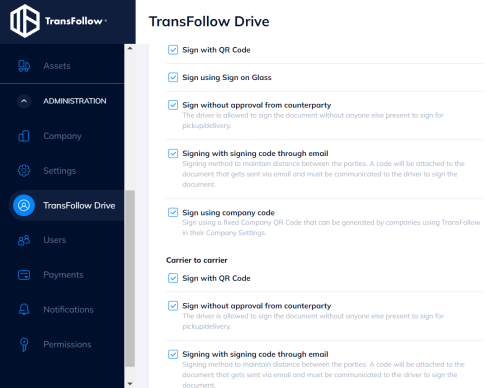
- Signing method descriptions
We have added some explanatory text to our signing methods. This way our TF Portal users are better informed about the different signing methods we provide.
- Clarify the registration process
We simplified the registration process and made it easier to understand when users create an account.
PDF
- Reason for missing location in the signature
API
- PDF URL returned upon Freight Document creation
Other
We have continued optimizing our platform by fixing some minor bugs and adding some technical improvements. -
TransFollow Drive App
- Mandatory picture

TransFollow Portal
- Delivery date filter
- New search field
- Attachments
- .CSV export
PDF
- Attachments list
Other
We have continued optimizing our platform by fixing some minor bugs and adding some technical improvements. -
TransFollow Drive App
- iOS version upgraded

TransFollow Portal
Partner
When new registrants confirm their registration they did through the TransFollow Portal and made a referral to a specific partner during registration, then that specific partner will receive an e-mail about that activated registrant.
Other
We have continued optimizing our platform by fixing some minor bugs and adding some technical improvements. -
TransFollow Drive App
- Select and sign all for Carrier Access Codes
 TransFollow Drive App users using the Carrier Access Code to login to the TransFollow Drive App can now select and sign all freight documents in one go instead of selecting them one by one.
API
- Packing slip can be shared upfront through a separate e-mail to consignees
PDF Service
- Links to view PDF attachments

Other
We have continued optimizing our platform by fixing some minor bugs and adding some technical improvements. -
TransFollow Drive App

- Data Saving Mode
- Login Error Clarification

PDF Service
- References

TransFollow Portal
- Customized Packages and Goods Description

-
TF Drive
- Improved vehicle editing when signing multiple fd’s
- Legal compliance driver name search
- SignOnGlass role name in company field
- Company VAT info
- Delegation for transport
- T&C Updated
- Navigation proper links
- Number of documents shown
- New API fleet management key type
-
2021.10
- TF Drive / Connect
- Add goods item;
- Disable carrier goods editing.
- TF Drive Intents: Law compliance login
- Arrival times changes Signing intent;
- (Un)loading times hidden;
- Logout as background intent.
- TF Portal: Documents + reports merged
- TF Connect: Carrier subaccount delegation
- Other work done: Polish language added back into TF Drive app
- TF Drive / Connect
-
2021.10
- TransFollow Portal - Configure mission workflow: In the TransFollow Portal it is now possible to configure the mission workflow for the TransFollow Drive users. It is possible to set this for all missions and for each individually. There is also a new step to add, check in at security.
- ID check step: A new step for the workflow to TransFollow Drive is the security check. We enabled a security check on drivers upon arrival at the consignor or consignee by configuration of the freight document. This will be done by using the QR-code scanning to validate the parties.
- TF Portal: Copy the URL link of the PDF of the freight document to share immediately with other parties.
- Sub account migration: Creating and assigning a subaccount can now be done in the TransFollow Drive settings. You can create a sub account and easily assign the role in the overview to Driver or Vehicle (truck or trailer). The subaccount will also be presented in the assets.
-
2021.09
- TF Drive and PDF: When the submitter of the consignment note only enters the country code, we now also automatically show the name of the country, or the entered value by the submitter.
- TF Portal: Adding employee codes is now possible in the TransFollow Portal, for the company and the users. A unique QR code is generated from this code that the driver can scan to sign the consignment note. Read more here under ‘(Sub)accounts to use the TransFollow Portal’.
- TF Portal: It is now also possible to cancel documents.
- TF Portal: Exciting URL’s that were used before are now redirected to the proper pages or documents, also when the user first has to login.
-
2021.08
2.101.10 TF
- TF Drive: When the mission is not closed automatlcally (after rgistering departure time), this can be done manually by the user.
- TF Drive: The instructions from the carrier to the driver are now presented on the agreements and instructions section on TF Drive. [CarrierToDriverInstructions]
- All products: When needed, fax information can also be indicated in the contact details for each role, though the API. [ContactFaxNumber]
-
2021.07
3.16.0 APP 1.679.1 API
- App: Updated User Interface for the location permission due to new Android version 30 (GPS tracking) upon the first login.
- App: Tare weight are added to the Structured Goods of type Goods and Dangerous Goods. Total tare weight property has also been added to the Structured goods info on the freight document.
- App: For a specific user, we enabled a security check on the driver upon arrival at the consignor or consignee by configuration of the freight document. This will be done by using the QR-code scanning to validate the parties.
- API: It is now possible to add multiple Access Codes for a freight document. The submitter can still do this when the document is in Draft while we added the possibility for the carrier to do this in Draft, Issued and Transit through the API.
-
2021.06
3.11.3 App 1.666.6 API
- Add image URL to RTI in the TransFollow App to make the RTI visible
- Introduction additional employee identification in Company Code Signing
- Adjust license plate for issued Freigt Document with the TransFollow API
-
2021.05
3.7.0 App 1.662.1 API
- Temperature Inspection in the TransFollow App, now only to enter decimals.
- Add RTI – When adding Returnable Transport Items it’s now possible, after indicating the first item, to click on ‘Save and add another’ in the TransFollow App
- Freight Document retrieval technical optimizations to improve our response time
-
2021.04
3.4.4 App 1.652.2 API
- Contact field added to role editing - it is possible to add more contact details of the counter parties whilst creating a freight document in the TransFollow App.
- SMS unavailable - if no SMS notification is available on the board computer, this possibility is hidden during the signing flow.
- Email notification sent after goods inspection an notification email to the counterparties after the signing the freight document after inspection of the goods.
- Subscription/webhook expanded for comments this is also enabled for the use of comments on the level of ‘warning’ or ‘irregularity’ for a connection with our API.
Jak mohu odeslat zpětnou vazbu týkající se TransFollow?
Velmi si ceníme vaší zpětné vazby k aplikaci TransFollow a portálu TransFollow Portal a připomínkám k jednotlivým funkcím. To vše nám pomáhá dále zlepšovat naše služby. Neváhejte, a pošlete námsvé připomínky a doporučení na zlepšení na na adresu info@transfollow.org.
Jak jsou moje data chráněna v TransFollow?
eCMRs obsahují mnoho citlivých informací, které by neměly být viděny nebo použity žádnou stranou, jež není přímo zapojena do přepravy. Proto při používání TransFollow je každý eCMR viditelný pouze pro účty, které jsou s ním propojeny, což v praxi znamená, že žádná třetí strana nemá přístup k informacím v něm uloženým. TransFollow také nepoužívá žádná data poskytnutá uživateli pro komerční účely.
Koho mám kontaktovat v případě, že potřebuji podporu?
Jste-li uživatelem TransFollow a potřebujete podporu týkající se funkcí aplikace TransFollow nebo portálu TransFollow Portal, můžete si prohlédnout naše instruktážní videa nebo se obrátit na místního partnera. Jako poskytovatel softwaru s aktivní nebo potenciální integrací s TransFollow můžete kontaktovat náš tým podpory zasláním e-mailu na adresu support@transfollow.org.
Kde lze najít technické specifikace pro propojení s TransFollow?
K dispozici je návod na integraci, který obsahuje všechny technické specifikace TransFollow,. Naleznete jej na developer.transfollow.com.